
Claude Code
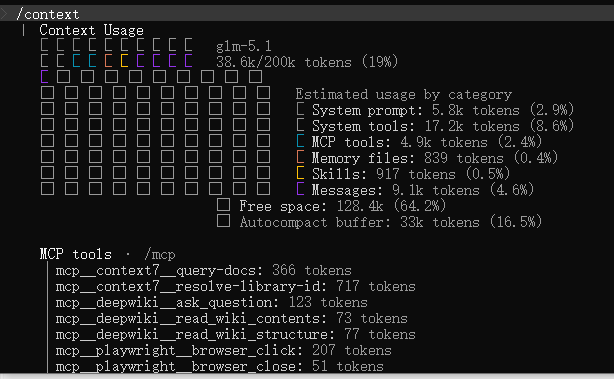
/context 可视化上下文占用
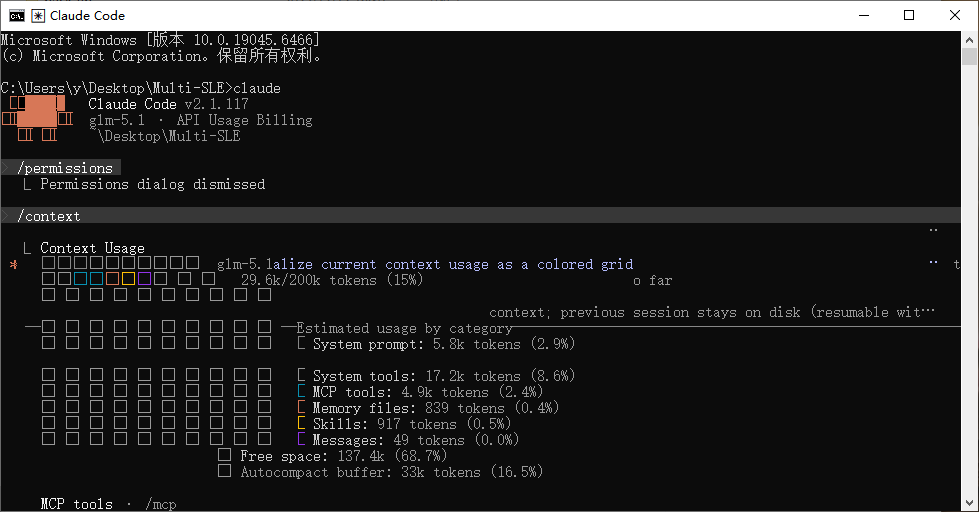
新打开一个文件夹,启动 cc,输入 /context:
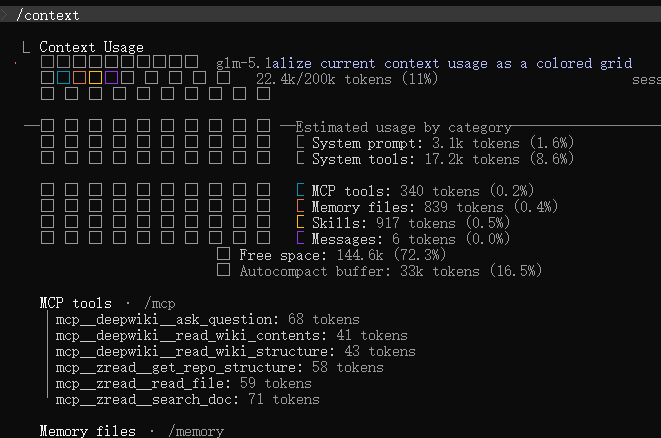
复制本地配置过的 .claude 文件夹进去后,重启 claude,看 context:
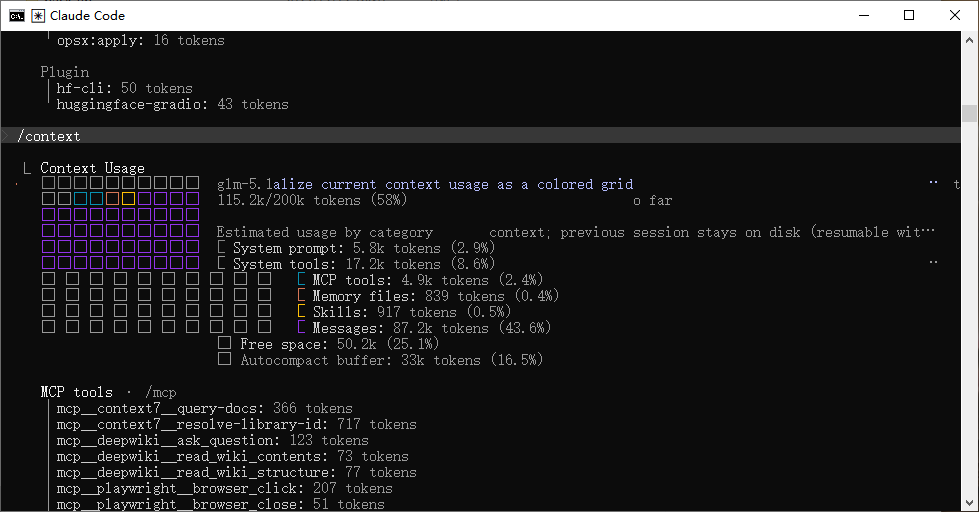
在一个文件夹启动 cc,任务多轮后,输入 /context,可见主要增长的就是 messages:
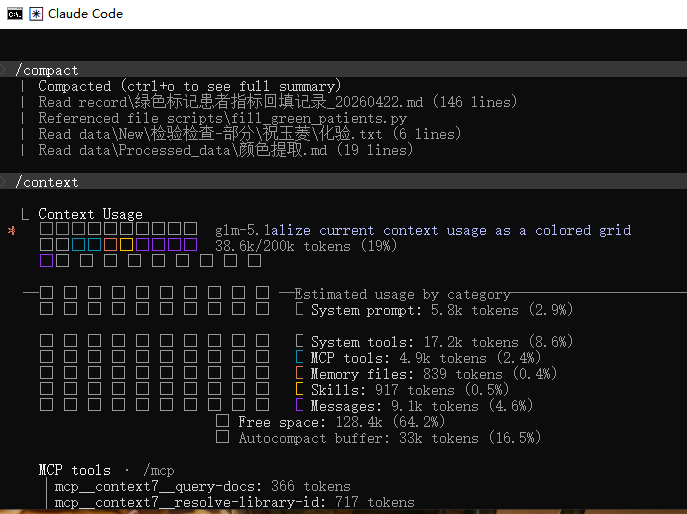
/compact 压缩上下文之后再看:
复制本地配置过的 .claude 文件夹进去后,重启 claude,恢复会话,再看 context,好像 sys prompt 和 MCP 都没有减小,说明恢复会话会加载原来的配置:
Codex
消息指令测试
指令:
codex debug prompt-input "hello"本地 Codex 的首轮并不是只把你的 hello 发给模型,而是先装入一整套运行规约,再补充环境上下文,最后才放入用户问题。从策略上看,它是先把模型”管住”,再把环境”讲清”,最后才让模型”做事”。这也符合官方对 Codex 初始推理输入的描述,首轮会围绕 instructions、tools 和 input 来组装,而不同 role 之间本身也有明确优先级。
1. 首轮加载内容
从你这次 codex debug prompt-input "hello" 的结果看,首轮可见输入一共分成三层。
第一层
developer 消息
里面有两大块:
permissions instructionsskills_instructions
也就是先注入:
- 沙箱和审批规则
- 可写目录
- 网络限制
- 已批准命令前缀
- 技能列表
- 技能触发和使用规则
这一层本质上是在定义 Codex 这轮能做什么,不能做什么,遇到什么情况该怎么做。
第二层
user 消息里的 environment_context
包括:
cwdshellcurrent_datetimezone
这一层本质上是在定义 Codex 现在身处什么执行环境。
第三层
真正的用户输入
也就是:
hello所以这次实验看到的首轮结构,不是”用户问题直达模型”,而是:
规约层 → 环境层 → 任务层
另外,官方也说明 Codex 的首轮推理并不只有这些消息,还会包含 tools 定义。你这次 prompt-input 展示出来的,更像是”消息输入视角”,不是整个请求载荷的完整展开。
2. 内容优先级
这次实验里最关键的优先级不是”哪句话写在前面”,而是”哪一类 role 更重”。
官方给出的角色优先级是:
system > developer > user > assistant
结合你这次结果,可以得到很直接的判断:
- 这轮可见内容里,最高的是
developer - 然后才是两个
user - 所以你的
hello实际上是处在 被权限规则和技能规则包住 的状态里
也就是说,模型先服从:
- 开发者注入的规约
- 再理解环境
- 最后才处理用户请求
因此这次实验能说明一个很重要的事实:
首轮最有权重的内容不是任务本身,而是行为约束。
3. 加载顺序
按你这次输出,可以把首轮加载顺序总结成:
- 先加载行为边界:权限、审批、沙箱、写入范围、网络限制
- 再加载能力边界:有哪些 skill,可不可以触发,触发后怎么找
SKILL.md - 再加载环境事实:当前目录、shell、日期、时区
- 最后加载用户问题:也就是这轮真正要解决的任务
这个顺序说明,Codex 首轮采用的不是”先听需求,再补约束”的方式,而是反过来:
先设框架,再放任务。
4. 加载策略
这次实验反映出的策略很清楚,可以概括成三点。
第一,先安全后执行
首轮先把权限和审批规则压进去,说明 Codex 默认把”安全执行”放在”尽快回答”前面。所以它不是一个纯聊天模型,而是一个带执行约束的代理。
第二,先通用规则后具体任务
permissions 和 skills 都是稳定的、通用的、跨任务复用的内容。hello 只是这一轮的具体需求。所以首轮会优先加载长期稳定规则,再加载短期任务。
第三,环境上下文被当作任务解释器
cwd、shell、timezone 这类信息虽然也是 user 层,但它们不是任务本身,而是帮助模型正确解释任务。比如同一句命令,在 PowerShell 和 bash 下就可能完全不同。
具体测试
C:\Users\y> codex debug prompt-input "hello"
[
  {
    "type": "message",
    "role": "developer",
    "content": [
      {
        "type": "input_text",
        "text": "<permissions instructions>\nFilesystem sandboxing defines which files can be read or written. `sandbox_mode` is `workspace-write`: The sandbox permits reading files, and editing files in `cwd` and `writable_roots`. Editing files in other directories requires approval. Network access is restricted.\n# Escalation Requests\r\n\r\nCommands are run outside the sandbox if they are approved by the user, or match an existing rule that allows it to run unrestricted. The command string is split into independent command segments at shell control operators, including but not limited to:\r\n\r\n- Pipes: |\r\n- Logical operators: &&, ||\r\n- Command separators: ;\r\n- Subshell boundaries: (...), $(...)\r\n\r\nEach resulting segment is evaluated independently for sandbox restrictions and approval requirements.\r\n\r\nExample:\r\n\r\ngit pull | tee output.txt\r\n\r\nThis is treated as two command segments:\r\n\r\n[\"git\", \"pull\"]\r\n\r\n[\"tee\", \"output.txt\"]\r\n\r\nCommands that use more advanced shell features like redirection (>, >>, <), substitutions ($(...), ...), environment variables (FOO=bar), or wildcard patterns (*, ?) will not be evaluated against rules, to limit the scope of what an approved rule allows.\r\n\r\n## How to request escalation\r\n\r\nIMPORTANT: To request approval to execute a command that will require escalated privileges:\r\n\r\n- Provide the `sandbox_permissions` parameter with the value `\"require_escalated\"`\r\n- Include a short question asking the user if they want to allow the action in `justification` parameter. e.g. \"Do you want to download and install dependencies for this project?\"\r\n- Optionally suggest a `prefix_rule` - this will be shown to the user with an option to persist the rule approval for future sessions.\r\n\r\nIf you run a command that is important to solving the user's query, but it fails because of sandboxing or with a likely sandbox-related network error (for example DNS/host resolution, registry/index access, or dependency download failure), rerun the command with \"require_escalated\". ALWAYS proceed to use the `justification` parameter - do not message the user before requesting approval for the command.\r\n\r\n## When to request escalation\r\n\r\nWhile commands are running inside the sandbox, here are some scenarios that will require escalation outside the sandbox:\r\n\r\n- You need to run a command that writes to a directory that requires it (e.g. running tests that write to /var)\r\n- You need to run a GUI app (e.g., open/xdg-open/osascript) to open browsers or files.\r\n- If you run a command that is important to solving the user's query, but it fails because of sandboxing or with a likely sandbox-related network error (for example DNS/host resolution, registry/index access, or dependency download failure), rerun the command with `require_escalated`. ALWAYS proceed to use the `sandbox_permissions` and `justification` parameters. do not message the user before requesting approval for the command.\r\n- You are about to take a potentially destructive action such as an `rm` or `git reset` that the user did not explicitly ask for.\r\n- Be judicious with escalating, but if completing the user's request requires it, you should do so - don't try and circumvent approvals by using other tools.\r\n\r\n## prefix_rule guidance\r\n\r\nWhen choosing a `prefix_rule`, request one that will allow you to fulfill similar requests from the user in the future without re-requesting escalation. It should be categorical and reasonably scoped to similar capabilities. You should rarely pass the entire command into `prefix_rule`.\r\n\r\n### Banned prefix_rules \r\nAvoid requesting overly broad prefixes that the user would be ill-advised to approve. For example, do not request [\"python3\"], [\"python\", \"-\"], or other similar prefixes that would allow arbitrary scripting.\r\nNEVER provide a prefix_rule argument for destructive commands like rm.\r\nNEVER provide a prefix_rule if your command uses a heredoc or herestring. \r\n\r\n### Examples\r\nGood examples of prefixes:\r\n- [\"npm\", \"run\", \"dev\"]\r\n- [\"gh\", \"pr\", \"check\"]\r\n- [\"cargo\", \"test\"]\r\n\n\n## Approved command prefixes\nThe following prefix rules have already been approved: - [\"C:\\\\Windows\\\\System32\\\\WindowsPowerShell\\\\v1.0\\\\powershell.exe\", \"-Command\", \"$env:Path=\\\"$HOME\\\\.local\\\\bin;$env:Path\\\"; & \\\"$HOME\\\\.local\\\\bin\\\\nullclaw.exe\\\" channel start lark\"]\n- [\"C:\\\\Windows\\\\System32\\\\WindowsPowerShell\\\\v1.0\\\\powershell.exe\", \"-Command\", \"Get-CimInstance Win32_Process -Filter \\\"name = 'nullclaw.exe'\\\" | Select-Object ProcessId,CommandLine\"]\n- [\"C:\\\\Windows\\\\System32\\\\WindowsPowerShell\\\\v1.0\\\\powershell.exe\", \"-Command\", \"Stop-Process -Id 49804 -Force; Start-Sleep -Seconds 1; $env:Path=\\\"$HOME\\\\.local\\\\bin;$env:Path\\\"; $p = Start-Process -FilePath \\\"$HOME\\\\.local\\\\bin\\\\nullclaw.exe\\\" -ArgumentList 'gateway' -RedirectStandardOutput \\\"$HOME\\\\.nullclaw\\\\gateway.stdout.log\\\" -RedirectStandardError \\\"$HOME\\\\.nullclaw\\\\gateway.stderr.log\\\" -PassThru; Set-Content -Path \\\"$HOME\\\\.nullclaw\\\\gateway.pid\\\" -Value $p.Id; \\\"gateway_pid=$($p.Id)\\\"\"]\n- [\"C:\\\\Windows\\\\System32\\\\WindowsPowerShell\\\\v1.0\\\\powershell.exe\", \"-Command\", \"Stop-Process -Id 9844 -Force; Start-Sleep -Seconds 2; $env:ZIG_GLOBAL_CACHE_DIR=\\\"$HOME\\\\src\\\\zig-global-cache\\\"; & \\\"$HOME\\\\tools\\\\zig-x86_64-windows-0.15.2\\\\zig.exe\\\" build -Doptimize=ReleaseSmall -p \\\"$HOME\\\\.local\\\"; $env:Path=\\\"$HOME\\\\.local\\\\bin;$env:Path\\\"; $p = Start-Process -FilePath \\\"$HOME\\\\.local\\\\bin\\\\nullclaw.exe\\\" -ArgumentList 'gateway' -RedirectStandardOutput \\\"$HOME\\\\.nullclaw\\\\gateway.stdout.log\\\" -RedirectStandardError \\\"$HOME\\\\.nullclaw\\\\gateway.stderr.log\\\" -PassThru; Set-Content -Path \\\"$HOME\\\\.nullclaw\\\\gateway.pid\\\" -Value $p.Id; \\\"gateway_pid=$($p.Id)\\\"\"]\n The writable roots are `C:\\Users\\y\\.codex\\memories`, `C:\\Users\\y`.\n</permissions instructions>"
      },
      {
        "type": "input_text",
        "text": "<skills_instructions>\n## Skills\nA skill is a set of local instructions to follow that is stored in a `SKILL.md` file. Below is the list of skills that can be used. Each entry includes a name, description, and file path so you can open the source for full instructions when using a specific skill.\n### Available skills\n- imagegen: Generate or edit raster images when the task benefits from AI-created bitmap visuals such as photos, illustrations, textures, sprites, mockups, or transparent-background cutouts. Use when Codex should create a brand-new image, transform an existing image, or derive visual variants from references, and the output should be a bitmap asset rather than repo-native code or vector. Do not use when the task is better handled by editing existing SVG/vector/code-native assets, extending an established icon or logo system, or building the visual directly in HTML/CSS/canvas. (file: C:/Users/y/.codex/skills/.system/imagegen/SKILL.md)\n- openai-docs: Use when the user asks how to build with OpenAI products or APIs and needs up-to-date official documentation with citations, help choosing the latest model for a use case, or explicit GPT-5.4 upgrade and prompt-upgrade guidance; prioritize OpenAI docs MCP tools, use bundled references only as helper context, and restrict any fallback browsing to official OpenAI domains. (file: C:/Users/y/.codex/skills/.system/openai-docs/SKILL.md)\n- plugin-creator: Create and scaffold plugin directories for Codex with a required `.codex-plugin/plugin.json`, optional plugin folders/files, and baseline placeholders you can edit before publishing or testing. Use when Codex needs to create a new local plugin, add optional plugin structure, or generate or update repo-root `.agents/plugins/marketplace.json` entries for plugin ordering and availability metadata. (file: C:/Users/y/.codex/skills/.system/plugin-creator/SKILL.md)\n- skill-creator: Guide for creating effective skills. This skill should be used when users want to create a new skill (or update an existing skill) that extends Codex's capabilities with specialized knowledge, workflows, or tool integrations. (file: C:/Users/y/.codex/skills/.system/skill-creator/SKILL.md)\n- skill-installer: Install Codex skills into $CODEX_HOME/skills from a curated list or a GitHub repo path. Use when a user asks to list installable skills, install a curated skill, or install a skill from another repo (including private repos). (file: C:/Users/y/.codex/skills/.system/skill-installer/SKILL.md)\n- openspec-apply-change: Implement tasks from an OpenSpec change. Use when the user wants to start implementing, continue implementation, or work through tasks. (file: C:/Users/y/.codex/skills/openspec-apply-change/SKILL.md)\n- openspec-archive-change: Archive a completed change in the experimental workflow. Use when the user wants to finalize and archive a change after implementation is complete. (file: C:/Users/y/.codex/skills/openspec-archive-change/SKILL.md)\n- openspec-explore: Enter explore mode - a thinking partner for exploring ideas, investigating problems, and clarifying requirements. Use when the user wants to think through something before or during a change. (file: C:/Users/y/.codex/skills/openspec-explore/SKILL.md)\n- openspec-propose: Propose a new change with all artifacts generated in one step. Use when the user wants to quickly describe what they want to build and get a complete proposal with design, specs, and tasks ready for implementation. (file: C:/Users/y/.codex/skills/openspec-propose/SKILL.md)\n### How to use skills\n- Discovery: The list above is the skills available in this session (name + description + file path). Skill bodies live on disk at the listed paths.\n- Trigger rules: If the user names a skill (with `$SkillName` or plain text) OR the task clearly matches a skill's description shown above, you must use that skill for that turn. Multiple mentions mean use them all. Do not carry skills across turns unless re-mentioned.\n- Missing/blocked: If a named skill isn't in the list or the path can't be read, say so briefly and continue with the best fallback.\n- How to use a skill (progressive disclosure):\n  1) After deciding to use a skill, open its `SKILL.md`. Read only enough to follow the workflow.\n  2) When `SKILL.md` references relative paths (e.g., `scripts/foo.py`), resolve them relative to the skill directory listed above first, and only consider other paths if needed.\n  3) If `SKILL.md` points to extra folders such as `references/`, load only the specific files needed for the request; don't bulk-load everything.\n  4) If `scripts/` exist, prefer running or patching them instead of retyping large code blocks.\n  5) If `assets/` or templates exist, reuse them instead of recreating from scratch.\n- Coordination and sequencing:\n  - If multiple skills apply, choose the minimal set that covers the request and state the order you'll use them.\n  - Announce which skill(s) you're using and why (one short line). If you skip an obvious skill, say why.\n- Context hygiene:\n  - Keep context small: summarize long sections instead of pasting them; only load extra files when needed.\n  - Avoid deep reference-chasing: prefer opening only files directly linked from `SKILL.md` unless you're blocked.\n  - When variants exist (frameworks, providers, domains), pick only the relevant reference file(s) and note that choice.\n- Safety and fallback: If a skill can't be applied cleanly (missing files, unclear instructions), state the issue, pick the next-best approach, and continue.\n</skills_instructions>"
      }
    ]
  },
  {
    "type": "message",
    "role": "user",
    "content": [
      {
        "type": "input_text",
        "text": "<environment_context>\n  <cwd>C:\\Users\\y</cwd>\n  <shell>powershell</shell>\n  <current_date>2026-04-22</current_date>\n  <timezone>Asia/Shanghai</timezone>\n</environment_context>"
      }
    ]
  },
  {
    "type": "message",
    "role": "user",
    "content": [
      {
        "type": "input_text",
        "text": "hello"
      }
    ]
  }
]